

What is website accessibility and why should every business care?
Because great design should work for everyone.
At DoubleShot Creative, we know the best websites aren’t just beautiful—they’re accessible. Whether you’re revamping your site or launching something new, building with accessibility in mind helps you reach a broader audience, improve user experience, and stay legally compliant.
In this complete guide to website accessibility and ADA compliance, we’ll break down what it all means, why it matters, and how to create an inclusive web experience from the ground up.
Why do website accessibility and ADA compliance matter?
Web accessibility ensures that all users—including people with disabilities—can navigate, understand, and interact with your website. It’s not just a nice-to-have feature.
It’s a vital piece of digital design that:
- Meets legal obligations under the Americans with Disabilities Act (ADA)
- Improves SEO, especially when accessibility aligns with technical best practices
- Boosts usability for everyone, not just people using assistive tech
- Reflects your brand values of inclusion, empathy, and innovation
According to the CDC, one in four adults in the U.S. lives with some form of disability. That’s a huge segment of your potential audience—and they deserve a seamless experience.
What is WCAG 2.2 and how does it relate to ADA compliance?
When we talk about ADA-compliant websites, we’re referring to sites that meet the Web Content Accessibility Guidelines (WCAG)—the global standard for accessibility best practices.
The latest version, WCAG 2.2, breaks compliance down into three levels:
- Level A – Minimum accessibility
- Level AA – Mid-range (and what most businesses should aim for)
- Level AAA – Highest standard (ideal, but not always realistic for all content)
Meeting WCAG 2.2 Level AA is the industry sweet spot—it makes your website compliant, usable, and protected.
What are the four WCAG principles (POUR) and how do they apply?
WCAG is built on four foundational principles: Perceivable, Operable, Understandable, and Robust (sometimes remembered by the acronym POUR). These guide how to structure and design content that works for everyone:
| Perceivable Users must be able to perceive content through at least one of their senses (sight, sound, touch). Examples: alt text for images, transcripts for videos, readable color contrast. | Operable Visitors must be able to operate the interface, no matter their input method. Examples: full keyboard navigation, pause/stop for moving content, no time-based hurdles. |
| Understandable Information and UI must be easy to follow and consistent. Examples: clear instructions, readable fonts, consistent navigation. For a deeper dive into visual hierarchy, layout clarity, and intuitive navigation—all of which support accessibility—see our 11 graphic design principles to elevate your brand. | Robust Content must be reliably interpreted by a wide range of user agents—including assistive technologies. Examples: semantic HTML, ARIA roles, proper form markup. |
Keeping these principles top of mind helps you build a website that meets technical standards while also feeling intuitive and human-centered.
What are the key elements of ADA-compliant web design?
Creating an accessible website doesn’t require sacrificing good design. In fact, it often improves it. Here are some core principles to build from:
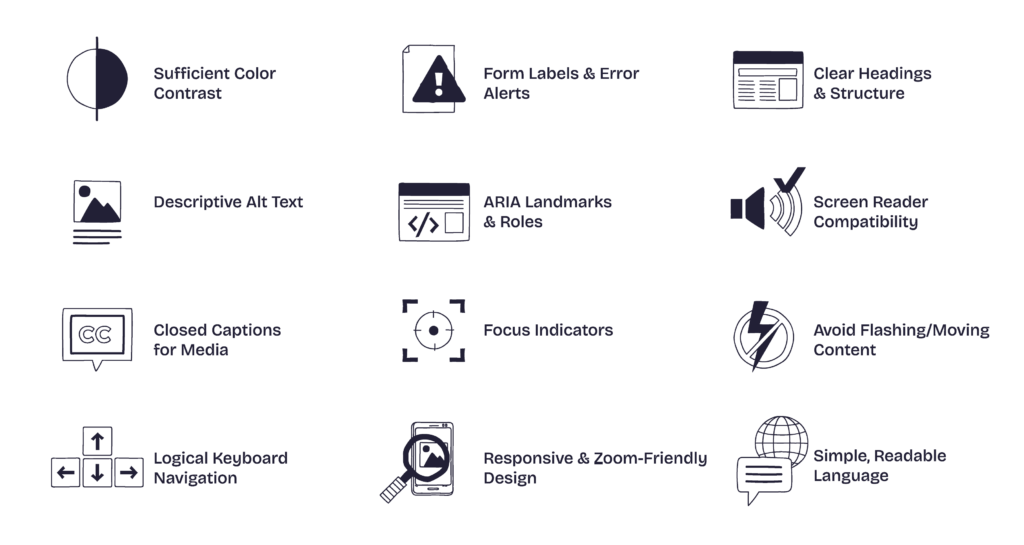
- Add Alternative Text for Visuals: Screen readers rely on descriptive alt text to convey the meaning of images, icons, and buttons. And when it comes to sourcing visuals, using inclusive, high-quality images from the start makes a big difference, this guide to free stock media is a helpful place to start.
- Ensure Full Keyboard Navigation: Every interactive element—from menus to forms—must be accessible without a mouse.
- Check Your Color Contrast: Text should be readable, even for users with low vision or color blindness. Aim for a contrast ratio of at least 4.5:1.
- Use Resizable, Responsive Text: Allow users to zoom in up to 200% without breaking layout or function.
- Write Clear, Descriptive Links: Avoid generic phrases like “click here.” Use link text that explains where it’s going.
- Label Your Forms Properly: Each field should have an accessible label, and error messages should be easy to understand and fix.
- Caption Your Media: Provide captions or transcripts for all video and audio content so users can still access your message in alternate formats.
ADA Compliance Checklist for Websites
How do you conduct a web accessibility audit?
Ready to evaluate your site? Start with a web accessibility audit using these trusted tools:
- WAVE by WebAIM
- axe DevTools
- Lighthouse (built into Chrome DevTools)
Don’t stop there. Manual testing can catch what tools miss:
- Try navigating with only a keyboard.
- Enable a screen reader and explore your site from a new perspective.
- Use a color contrast checker to make sure your visual choices are accessible.
What are the best website accessibility tools available?
Want to level up your accessibility game? Here are a few top-rated solutions to support you:
– accessiBe: AI-powered widget that helps monitor and fix accessibility issues
– Deque axe Monitor: Enterprise-grade auditing and reporting tools
– UserWay: Offers automated accessibility improvements and overlays
– Siteimprove: Full accessibility and performance monitoring suite
Note: While tools help, human-centered design and manual review are still essential for true ADA website compliance.

Is accessibility a one-time project or an ongoing process?
Accessibility isn’t a one-time checklist. It’s an ongoing practice—just like SEO or content strategy. You’ll need to maintain compliance over time as you launch new pages, update content, or introduce new functionality.
And when accessibility is baked into your design system and dev workflows? Everyone wins.
Let’s Build a More Inclusive Web
Prioritizing digital accessibility isn’t just about staying compliant—it’s about being a better brand. An ADA-compliant website increases your reach, reduces legal risk, and makes your online experience better for every visitor.
If you’re unsure where to start or need support conducting a website accessibility audit, we’re here to help.